Your subscription
You choose the Azure subscription, region and resource group used for RAI. The AI resource and its usage sit within the Azure environment your team already manages.
 Let’s talk RAI
MEET REVELATION AI
RAI is Revelation AI, the optional AI toolkit built into Revelation helpdesk. It helps your team catch up on tickets, write clearer updates, improve ticket descriptions and ask questions, right where they already work.
Choose the features and people you want to start with. Try RAI with a small group, see how it helps, and expand when you’re ready.
To RAI, or not to RAI? Your decision.
Explore Revelation AI RAI is pronounced “Ray.”YOUR HELPDESK, WITH A HELPING HAND
Enable only the RAI features and people you choose. Start with a pilot, then expand on your terms.
All your licensed non-AI capabilities stay available.
Configured in your organization’s Azure AI environment.
Revelation remains fully featured without AI. If you do enable RAI, you can choose individual features and limit each one to selected teams or access levels, making a controlled pilot easy.
START SMALL / EXPAND WHEN READY
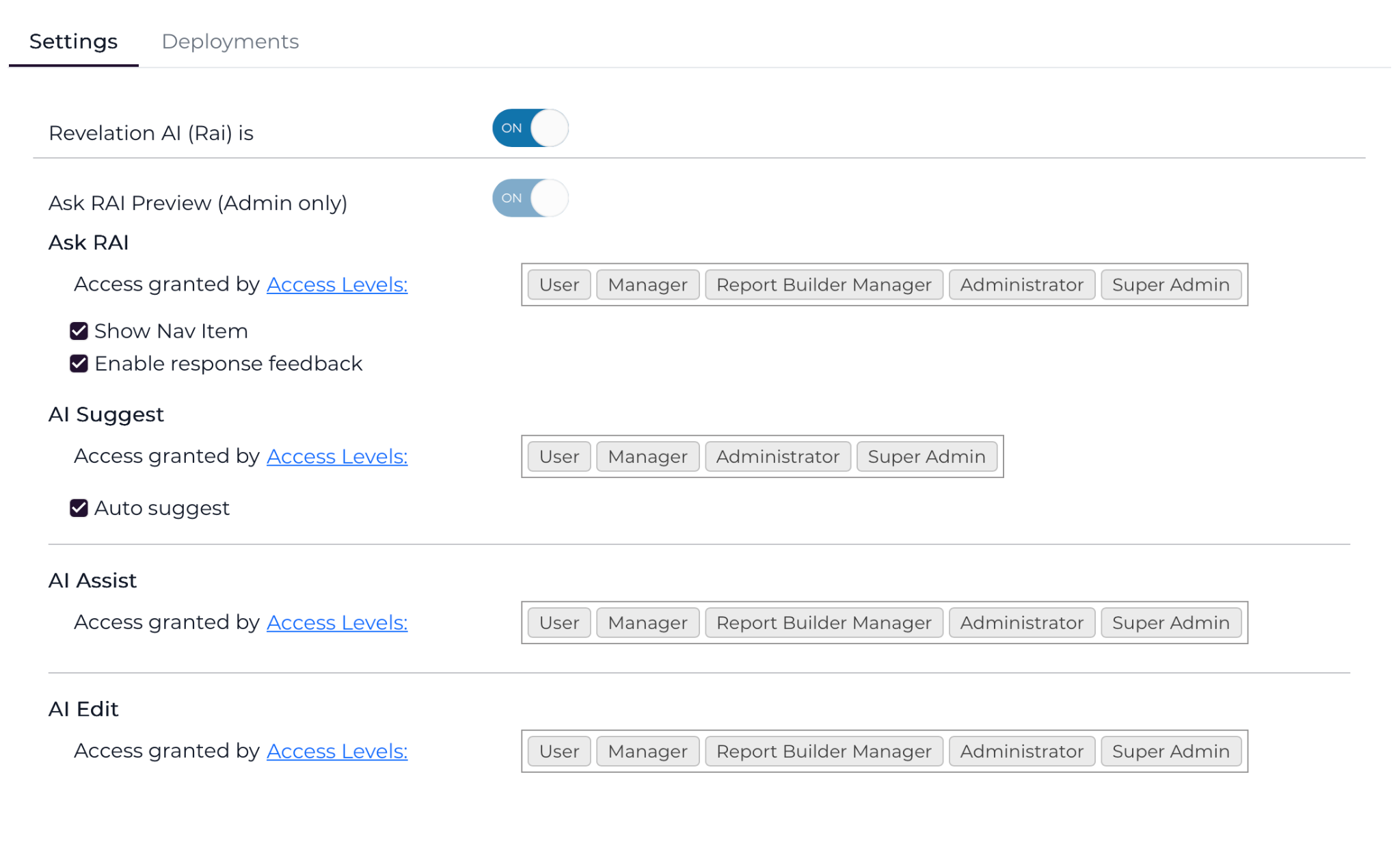
Enabling Revelation AI does not mean giving every AI feature to every person. Your administrators choose what is available and who can use it.
The main RAI switch makes AI capabilities available for your organization. It does not automatically roll every feature out to everyone.
Turn on the tools you want to explore, such as Ask RAI, AI Suggest, AI Assist or AI Edit. Leave the others out of your first phase.
Grant each feature to selected access levels or teams. Start with administrators or a small pilot group, learn what works, then broaden access when you are comfortable.
Yes, you can try RAI before a wider rollout. A small, controlled pilot lets you evaluate usefulness, usage and governance with the people you choose.
ACT I / A LITTLE LESS TOIL
Explore the RAI tools that help your team understand, write and act with better context.
THE TICKET, WITHOUT THE CATCH-UP
AI Assist uses the ticket’s context to help you understand what happened and consider what comes next.
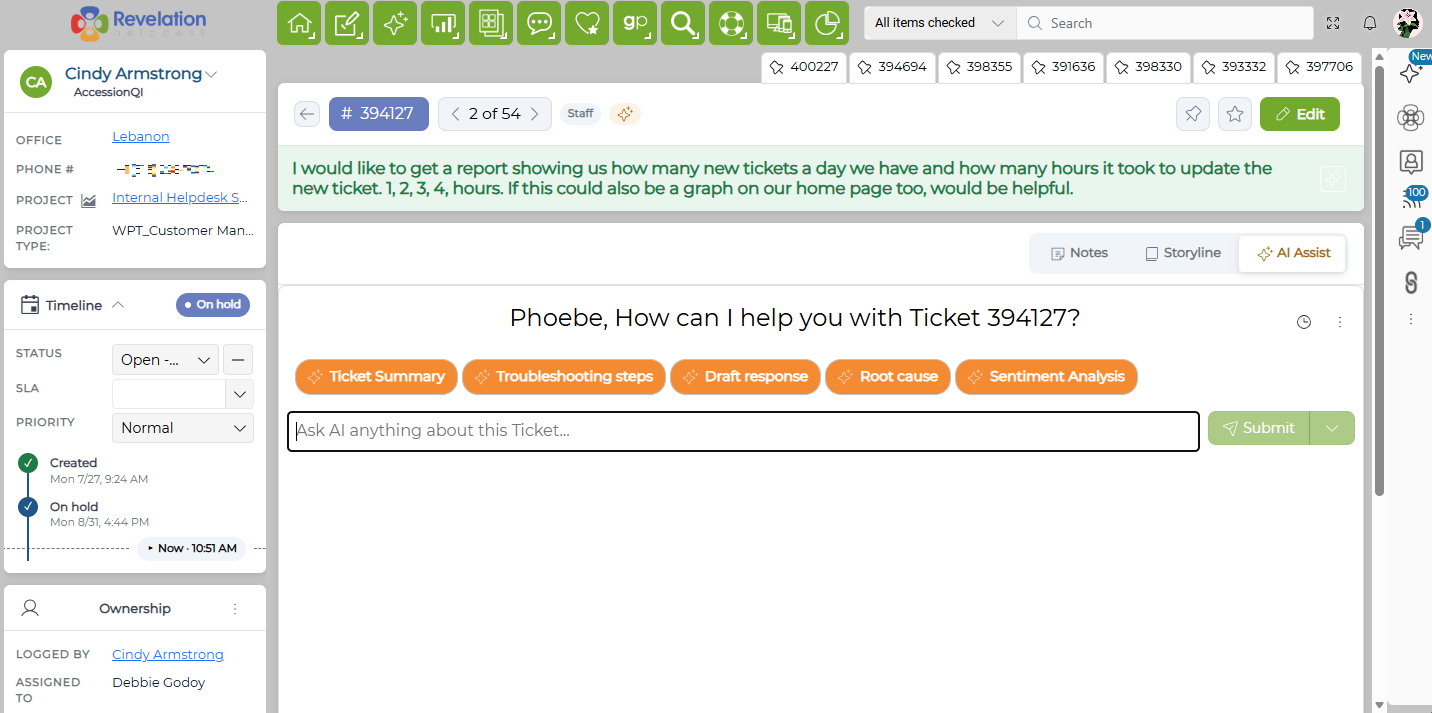
EXAMPLE CUSTOM PROMPT
“Prepare a handoff for the next agent. Include the issue, checks already completed, unresolved questions and suggested next steps.”
Shape the prompt around your team’s workflow.
Product screenshot. Appearance may vary by version and configuration.
WORDS, WORDS, WORDS.
Try the three AI Edit styles.
Original note “Changed network settings. Tested printing from all workstations. All working. Monitoring for two days.”
Illustrative, prewritten examples. No live AI request is made. Review AI output before using it.
GOVERNANCE / BUILT AROUND YOUR CONTROL
Have an AI policy to work within? RAI gives your team a concrete setup to assess: an Azure OpenAI resource in your own tenant, access you manage in Revelation, and a rollout you control.
Read the security story ↗“OUR AI POLICY DOESN’T ALLOW IT.”
A policy that restricts public AI tools may still allow an approved service managed through your organization’s Azure environment. RAI’s customer-controlled setup can support that approach. The useful next step is to review how RAI works against what your policy actually requires.
Your organization decides whether RAI meets its requirements. Owning the Azure resource supports that review; it does not automatically mean every use is approved.
THE FOUNDATION
The Azure OpenAI resource belongs to your organization, under the subscription and deployment settings you select.
Revelation administrators choose which AI features are available to selected teams or access levels.
Start with an approved pilot, review the results and usage, and expand access when you are ready.
Your team also controls the master RAI switch and can disable AI across the platform.
It depends on what your policy restricts. Rules about unapproved public tools, permitted data or access may be addressed through an approved Azure setup and RAI’s feature controls. If your policy prohibits all AI use, your organization would need to approve an exception or change before you enable RAI.
Share the actual RAI setup with your IT, security or governance team so they can make an informed decision.
Your organization selects the Azure subscription and deployment settings, manages AI access within Revelation, and decides which features to introduce. Azure usage and charges are visible through your subscription, so your team can review consumption alongside adoption.
See your spend controls ↓RAI sends the ticket context or text needed for the task to your organization’s configured Azure OpenAI resource. Your team should review the Azure service’s data handling and processing locations for the chosen deployment against your own requirements.
The resource is in your tenant; the applicable Azure service and deployment settings determine how and where processing takes place.
Microsoft’s data privacy and processing guidance ↗
Explore data security and AI ↗Yes. Enabling the RAI foundation does not mean enabling every feature for everyone. Give an approved team or access level access to the tools you want to evaluate, while keeping the wider rollout for a later decision.
Your policy owners can review the pilot’s usefulness, usage and results before approving broader access.
See how to start small ↑Yes. Your team reviews AI-generated content and decides how to use it. For example, AI Suggest lets agents inspect, edit and choose whether to apply a proposed description. Displaying a suggestion automatically does not apply it automatically.
The main RAI switch can disable all AI functionality. Revelation’s licensed non-AI capabilities remain available.
Start with the proposed use case, the ticket data involved, the selected Azure deployment, who will have access, how people will review results, and how usage and costs will be monitored.
We can walk your team through RAI’s setup and controls to support that review and help you define a manageable first step.
Let’s review RAI against your policy ↗ACT III / THE RAI-DINESS CHECK
Three practical questions. No sales score, no invented savings. Check what you already have in place.
FURTHER READING / LESS MYSTERY, MORE CONTEXT
Go deeper with the AI articles from Revelation helpdesk.
Looking ahead? Read the AI roadmap ↗ Roadmap ideas are not commitments or a list of currently available features.
YOUR AZURE / YOUR BUDGET
RAI runs through an Azure OpenAI resource in your own Azure tenant. Usage is billed to the Azure subscription you select, so visibility and control remain with your organization.
You choose the Azure subscription, region and resource group used for RAI. The AI resource and its usage sit within the Azure environment your team already manages.
Set the deployment capacity to match the size of your pilot and expected usage. Start lower, review real activity, and increase capacity later if your rollout grows.
Monitor usage and charges directly in Azure. Your Azure team can also use its normal cost-management budgets and alerts to keep an eye on consumption.
A PRACTICAL FIRST STEP
Pair a smaller RAI pilot group with a sensible starting capacity. You can review adoption, usefulness and Azure consumption before deciding whether to expand access or capacity.
THE NEXT ACT IS YOURS
Start with one useful feature, a small pilot group and a comfortable Azure capacity. Learn from real use, then decide whether to take RAI further.
Not to RAI? Also a perfectly good answer.
Your fully featured Revelation helpdesk is ready either way.